The accounts tab has seen the most significant round of work since JABA’s earliest builds, and the result is a view that now gives you a much clearer picture of where each account stands.
A Richer View on Every Account Card
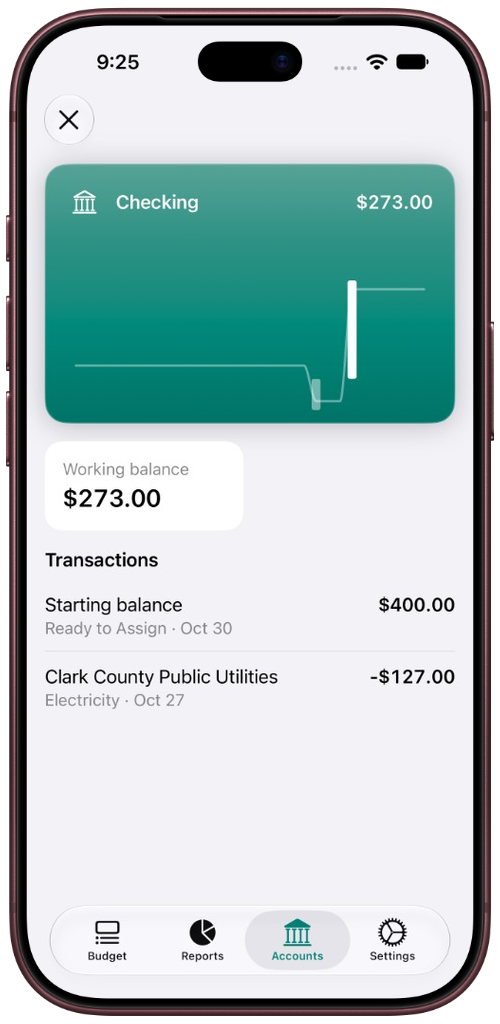
Each account card now displays a chart of the last 30 days directly on its face, showing daily inflows, spending, and closing balance at a glance. Before this change, a card told you your current balance and not much else. Now you can see the shape of an account’s recent activity without opening anything, which makes it easier to spot patterns or catch something unexpected.
Tap to Open an Account
Tapping a card now lifts it out of the stack and reveals its full transaction history, sorted with the most recent entries first. The working balance is shown prominently, and you can return to the account list with a close action or a downward drag. This gives each account its own focused view without navigating away from the accounts tab entirely.
Working Balances Now Reflect Today Accurately
Future-dated transactions are no longer included in the working balance. If you’ve recorded a transaction with a date that hasn’t arrived yet, it will not affect what your balance shows today. The balance also updates automatically when the day rolls over, so you don’t need to refresh anything manually to see the right number.
The App Icon Is Now Set
JABA’s icon is now configured correctly, so it appears on the home screen as intended rather than showing a placeholder.


How Transfers Are Treated
Some important groundwork was laid around how transfers between accounts are handled in JABA’s budgeting model. A payment from one account to another, such as paying off a credit card, is recorded as a transfer rather than as spending. This distinction matters for keeping your budget accurate: moving money between accounts should not look like money leaving your budget entirely. This logic is now formally defined and will shape how that category of transaction behaves throughout the app.
Each of these improvements brings JABA closer to the experience it is meant to be.