Credit cards are one of the more complex parts of any budget, and getting them right means handling a lot of moving pieces at once. This period of development was largely focused on making credit card transactions work the way they should: spending that becomes debt, payments that reduce what you owe, refunds that adjust your budget accurately, and balance transfers that move debt cleanly from one card to another. The result is a significantly more complete picture of how money flows when credit cards are involved.
Credit Card Payment Categories
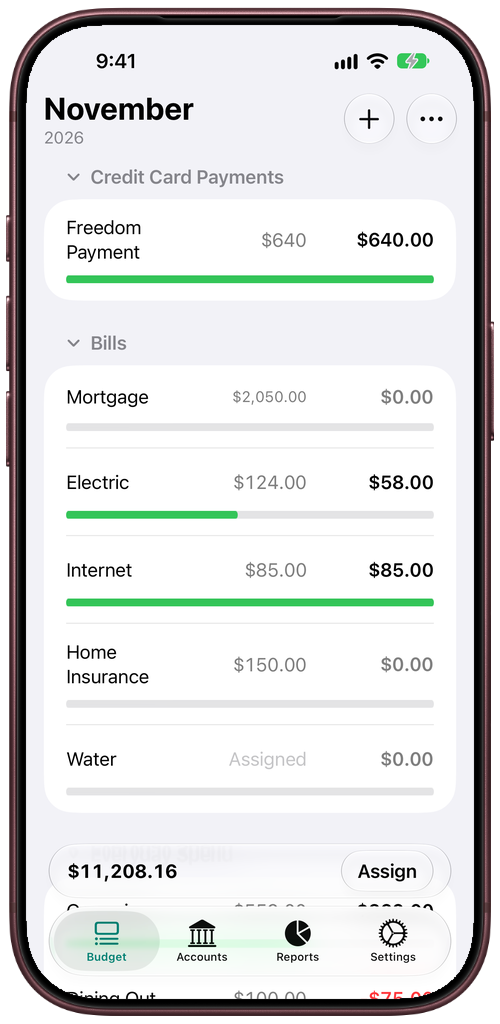
When you add a credit card to JABA, the budget now automatically creates a Payment Category for it under a dedicated Credit Card Payments group. This category tracks how much you have set aside to pay off that card’s debt. Only the portion of your spending that becomes actual debt moves into the Payment Category — if your card has a credit balance and you spend within it, that spending works like cash and does not affect the Payment Category. This distinction matters because it keeps your budget honest about what you actually owe versus what you have already covered.
Paying, Refunding, and Transferring
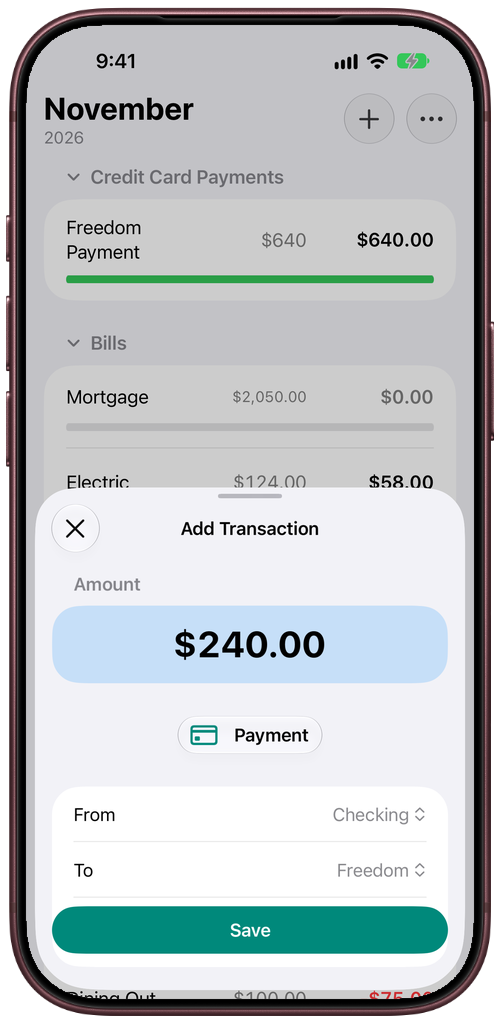
You can now record a credit card payment directly from the Add Transaction menu. Selecting Payment lets you choose a cash account as the source and the card you are paying, and that payment reduces the card’s Payment Category Remaining for the month it falls in.
Refunds work correctly too. When an inflow arrives on a credit card, JABA now calculates how much of that refund actually pays off debt and reduces the Payment Category accordingly. The portion that only fills a negative category balance does not affect it.
For people managing multiple cards, balance transfers are also supported. Recording a transfer from one credit card to another moves the debt to the destination card and shifts the money set aside in the Payment Category to match. The amount moved is capped at what the source card’s Payment Category actually holds on the date of the transfer.
Closing and Reopening Accounts
Accounts can now be closed. Before JABA will close an account, its working balance and Payment Category must both be at zero, and any future-dated transactions are removed. Closed accounts no longer appear in account pickers or the active account list, though past months continue to show their history. A collapsed Closed section keeps them accessible without cluttering the view.
Closing is not permanent. A closed account can be reopened from the same menu, and it comes back with everything intact. The budget correctly handles the period it was closed, keeping those months’ figures unchanged.
A Better Experience on iPad
On iPad, JABA now uses a sidebar instead of a tab bar when the window is wide enough. Each account appears as an individual item in the sidebar under Accounts, making it faster to jump between them without going through the accounts list first. On narrower windows and on iPhone, the familiar tab bar remains.
A smaller but useful improvement: when there are no accounts yet, the Accounts tab now shows a clear empty state with an Add Account button rather than a blank screen.
Overspending Carries Forward Correctly
The budget now handles overspending the way zero-based budgeting intends. When a category ends a month with a negative balance, that shortfall does not carry into the next month’s category balance. Instead, it comes out of Ready to Assign at the start of the next month, so the problem surfaces where you can address it rather than compounding silently.
Each of these improvements brings JABA closer to the experience it is meant to be.